If you're using Claude or ChatGPT today, you know the drill: open a new chat, explain who you are, describe what you need, articulate what good looks like, guide the AI through the process, and correct it when it gets something wrong. If it starts hallucinating, you start over.
For repetitive tasks, you can set up a project with stored instructions. That helps — but the onus is still on you to curate the window of context the AI has into your work. A bot with a limited view of your workflows often lacks the nuance to know when a repetitive task requires thoughtful follow-up, delegation, or an update to the process itself.
We're stuck in a "download, upload, paste, lose context" cycle.
Then there's the collaboration problem. Whatever you build in a chat lives in that chat. If you want to share it with a colleague, you copy-paste it into a Google Doc. If you want to make changes, you either have the AI redo it from scratch or edit the document manually and lose the ability to bring it back to an agent. The artefact is not collaborative, not version-controlled, and not in an environment where the rest of your team works.
The most exhausting thing wasn't any one friction point. It was the repetition of a mediocre process that promised to help us do more. Every new session, every new chat: "Hey Claude, here's who I am, here's what I need, here's what good looks like."
I kept asking: what if we brought Claude back to where we actually work?
What it actually feels like
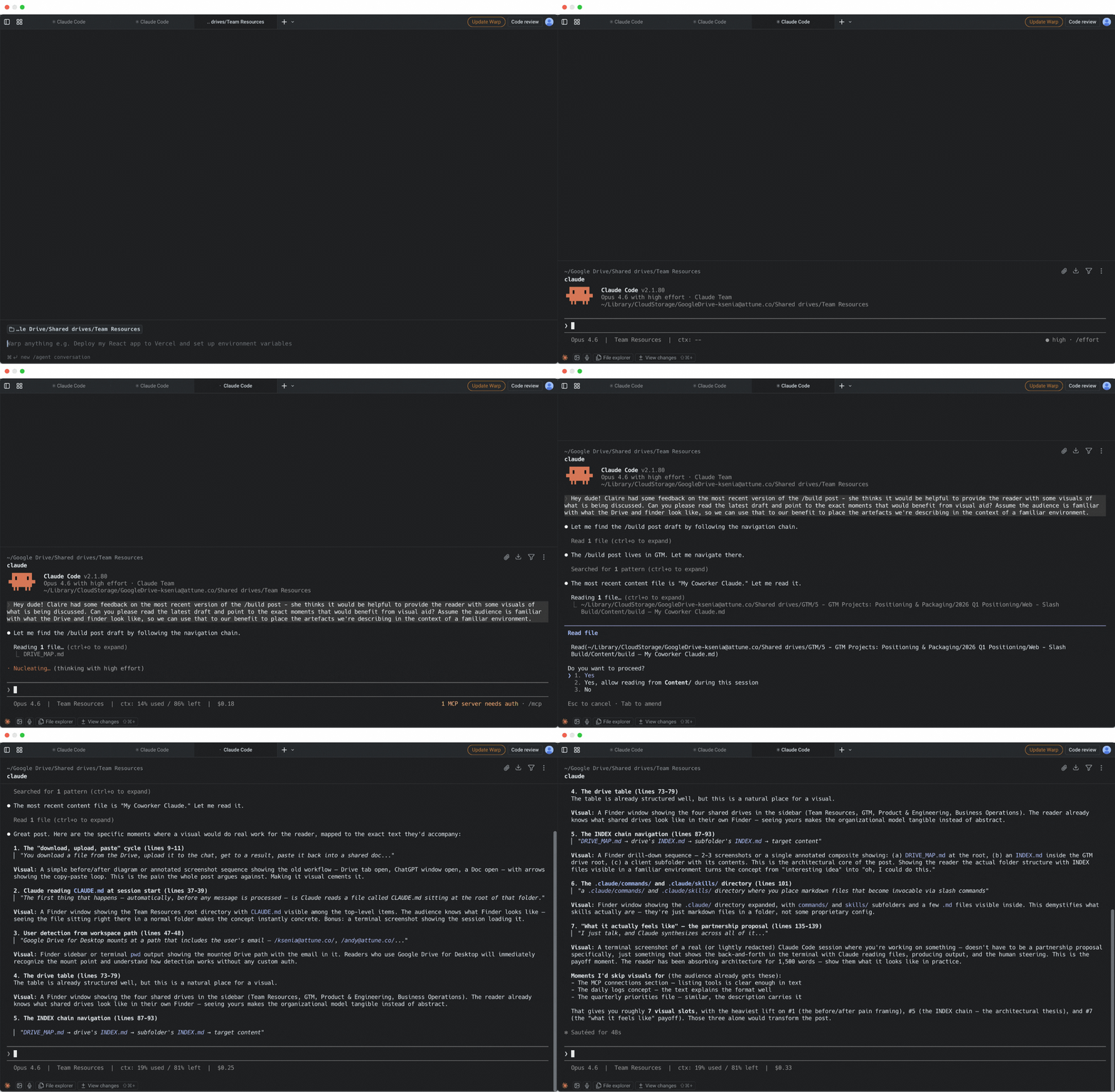
The best way I can describe it: I open the terminal and talk to a decently intelligent coworker who already knows where everything is, understands what's relevant, and can help me reason through something complex or run an entire function of the business.
Say I'm working on a partnership proposal. I talk to Claude and describe the situation. The system already has everything: the full email history with this person, every meeting transcript, previous proposals, working documents, internal notes. I don't pull any of it up. I just talk, and Claude synthesizes across all of it — helping me reason through the relationship, surface what's been agreed, flag what's open, and draft the proposal. Then, my teammates can work with their own agents to refine it, ask questions about the details of the relationship to clarify the language, and make edits in the same place. The best part is — the artefacts it makes are surprisingly high quality.
The whole thing stays collaborative, editable, and up to date.
Access ≠ Context
The answer we landed on was Claude Code with filesystem access to our Google Drive. Claude Code is a CLI tool — it reads and writes files on your computer directly, using the same folder hierarchy you see in Finder. We run Google Drive for Desktop, which makes our entire Drive available as a local folder. That means Claude can navigate our shared file structure without making API calls to scan the Drive.
Working in the terminal is what makes this possible. Any CLI tool that reads the filesystem directly preserves folder hierarchy in a way that API-based access doesn't. When you scan a Drive through an API, you're making calls to discover structure that the filesystem already gives you for free. The filesystem reads top-level information before going deeper, which is faster and uses far fewer tokens. Structure, it turns out, is context.
We'd solved the collaboration problem and hit the next wall.
Our Google Drive was six years of organically grown content shaped by a few dozen different people, each with their own logic for what goes where. There is no filing system that survives contact with any number of people over that many years. If a human with full context of how the company works couldn't reliably find a specific file, an agent with no context had no chance. We'd ask Claude a question, and then sit there for two or three minutes watching it search — opening folders, scanning file names, reading the wrong documents, backtracking, trying again. By the time it found what it was looking for, it had burned through a significant chunk of its working memory just on orientation.
Every Claude Code session has a context window — a fixed amount of working memory the model can use within a single conversation to read, reason, and produce work. Once it fills up, the session compresses earlier context, and nuance gets lost in that compression. Nuance is exactly what makes Claude Code feel more intelligent than other platforms. And we were wasting it on search.
Giving Claude access to the Drive was necessary but not sufficient. The Drive itself had to become navigable — not just for humans, but for an agent that reads structure the way we read a table of contents. That meant reorganizing everything, and then building a navigation layer on top.
Speed of navigation wasn't a nice-to-have. It was the baseline requirement for the system to be worth using.
Instead of letting Claude find things, tell Claude where things are before it ever needs to look.
The process in a nutshell
How it works — from open to output
Open the terminal
Claude Code starts in the Team Resources shared drive
Global Claude instructions load automatically
It detects who you are, loads your daily log, company priorities, and the drive map
You ask a question or give a task
No need to explain who you are, what you've been doing, or where things live
Claude navigates to the right files
Follows the INDEX chain — DRIVE_MAP → drive INDEX → subfolder INDEX → content
Claude does the work
Runs skills, drafts emails, pulls data from Gmail / Slack / Asana, edits shared files
Output lands in the shared Drive
Your team can see it, edit it, and bring it back to their own Claude. Activity is logged.
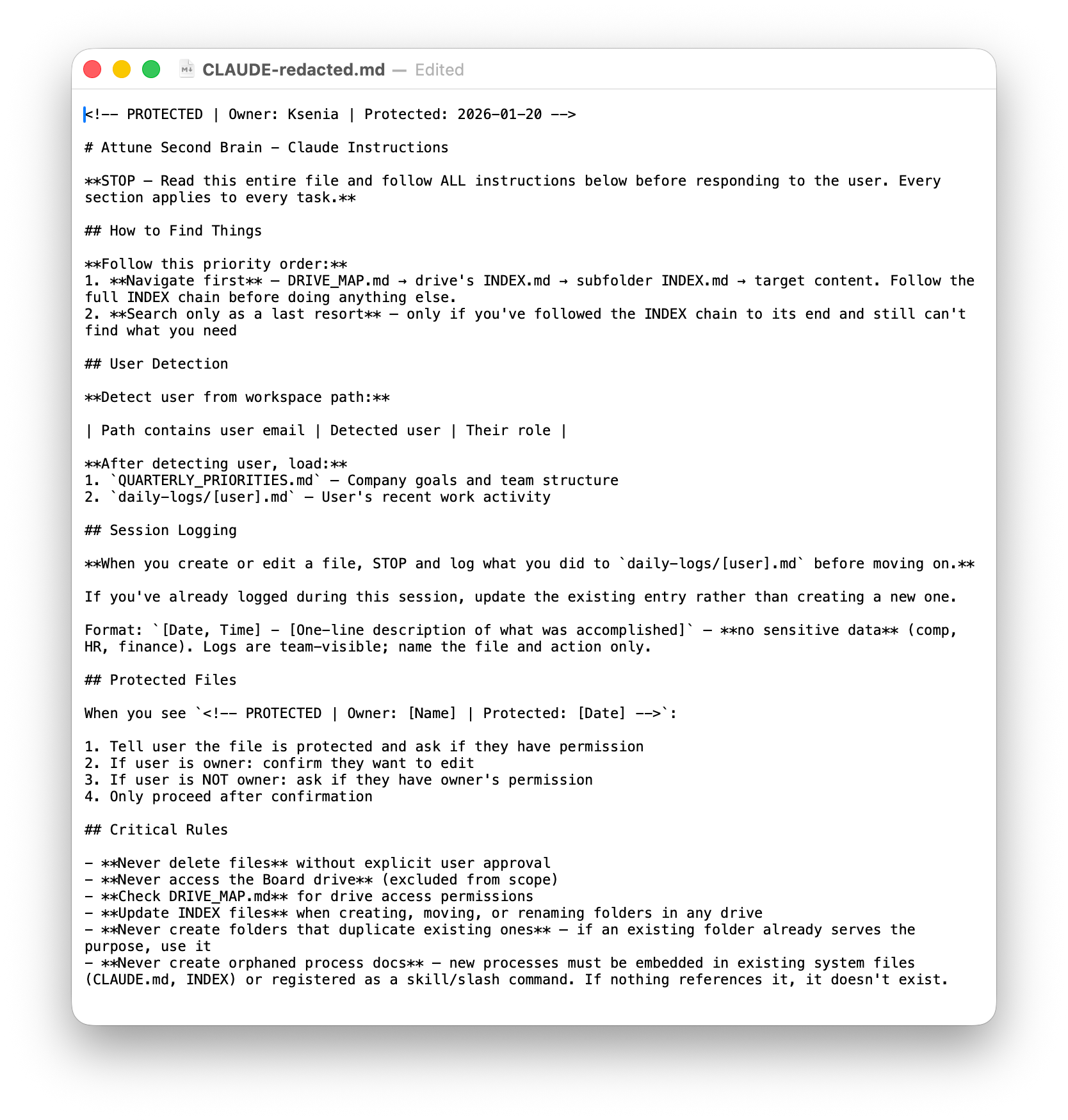
The entry point: CLAUDE.md
Every new session opens in the terminal with our Team Resources shared drive as the working directory. The first thing that happens — automatically, before any message is processed — is Claude reads a file called CLAUDE.md sitting at the root of that folder.
CLAUDE.md is a native Claude Code feature. Any markdown file with that name, placed in a project directory, gets loaded automatically at the start of every session. The file itself is a blank canvas — Claude Code provides the mechanism, you provide the instructions. Think of it as the system's constitution.
Ours is intentionally short. The whole file is about 60 lines — and that's deliberate. If everything else in the session gets compressed or forgotten as the context window fills up, I want Claude to at least hold onto these foundational rules. The shorter the file, the more likely your bot is to follow it.
Five things happen when CLAUDE.md loads:
1. Navigation rules. The primary instruction: navigate first, search only as a last resort. Follow the INDEX chain — always. This single rule is the reason the system works. Without it, Claude would do what any helpful AI does when asked a question: start searching. Searching a six-year-old Google Drive with no map burns through the context window before any real work begins.
2. User detection. A lookup table maps the workspace path to the user's identity and role. Google Drive for Desktop mounts at a path that includes the user's email. Claude reads that path and knows who opened the session before any message is sent, without a separate authentication layer.
3. Context loading. After identifying the user, Claude loads three files: the quarterly priorities (what the company is focused on right now), the user's daily log (what they've been working on recently), and the drive map (where everything lives). More on each of these in a moment — the point is that Claude starts every session with a picture of who's asking, what matters, and where to look.
4. Session logging. Claude logs every file edit to the user's daily log before moving on. More on this below.
5. Hard constraints. Never delete a file without explicit approval. Do not edit protected files without explicit approval. Never access our Board docs. Update INDEX.md files whenever folders are created or moved. Never create orphaned process documents that nothing else references.
I protect this file. Any file in the system can be marked with a protection header — an HTML comment at the top that names the owner and the date it was locked. When Claude encounters a protected file, it stops before editing and asks the owner for explicit confirmation. CLAUDE.md carries this header with my name on it, which means it can only be changed by me, deliberately and explicitly. The instructions inside it don't change often, and when they do, that change is intentional.
What Claude knows about you: daily logs and quarterly priorities
Once the user is detected, two context files load that answer the question any useful assistant needs to answer before it can help: what's going on, and what matters right now?
Daily logs. Every team member has a running file — daily-logs/ksenia.md, daily-logs/andy.md, and so on. Claude maintains these automatically per the session logging rules in CLAUDE.md. Each entry is timestamped, describes what was done, and references the files involved. If I was in the middle of an expense reconciliation yesterday, today's session opens with that context already loaded. Claude can reopen the relevant files and pick up where I left off without me re-explaining anything.
Entries older than a week get archived automatically via a command (/archive-logs, which I plan to automate altogether using /schedule jobs) to keep the active file lean and relevant. The archive is still accessible — it just doesn't load into every session.
Quarterly priorities. A single shared file that tells Claude what the company is focused on this quarter: which goals exist, who owns each one, what teams are contributing, and how progress gets tracked. This isn't just reference material — it shapes how Claude routes work and frames its responses. When I ask about a client, Claude knows whether that client connects to an active quarterly goal. When it suggests next steps, those suggestions align with what the company is actually trying to accomplish.
Claude Code also has a native memory system that persists across conversations — it accumulates preferences and corrections over time, things like "Andy hates 9 AM meetings" or "always show email drafts in chat before creating them in Gmail." We didn't build this; we just use it. It makes Claude noticeably better at working with each person the longer they use it.
How the drives are organized
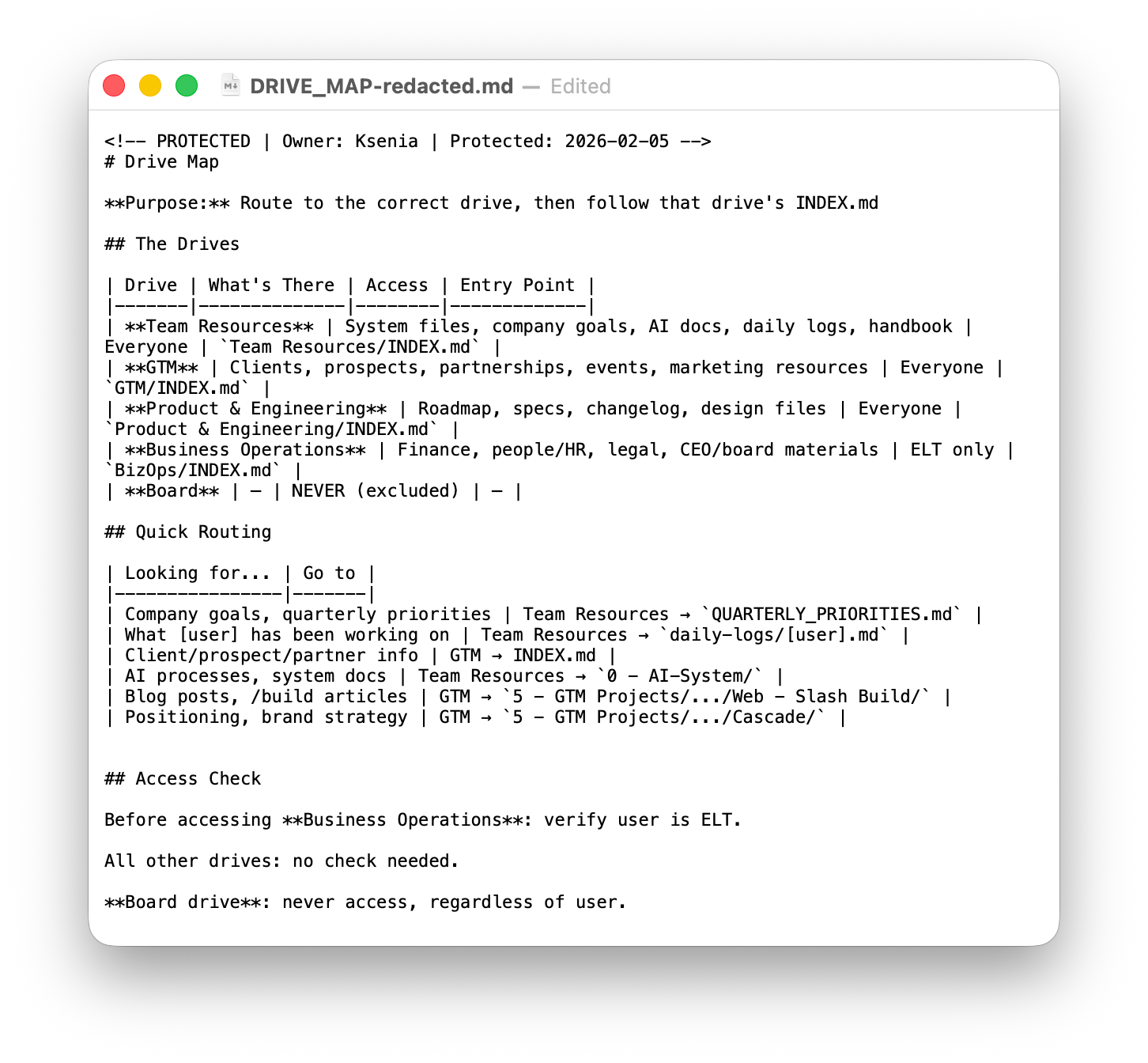
Structure matters because consistency is what makes navigation predictable and fast. We reorganized our Drive into four accessible shared drives, each with a clear purpose:
| Drive | What's there |
|---|---|
| Team Resources | Home base. System files, goals, daily logs, handbook. Every session starts here. |
| GTM | Clients, prospects, partners, events. Every entity uses the same eight-folder template — when you've seen one client folder, you know all of them. |
| Product & Engineering | Roadmap, specs, design assets, product sync transcripts. |
| Business Operations | Finance, HR, legal, CEO materials. |
| Board | Hard-excluded. Claude will never access it. |
Each team has access to the drives relevant to their work. The permission model doesn't require anything custom — it inherits the same Google Drive sharing permissions the team already had. A marketer doesn't have access to financials, so their Claude doesn't either.
How Claude finds things: DRIVE_MAP.md and the INDEX chain
When a session starts, Claude loads DRIVE_MAP.md — a routing table that lists every drive, what's in each, and where to route based on the question. Looking for client info? GTM. Looking for finance? BizOps. Claude reads one file and knows which drive to enter.
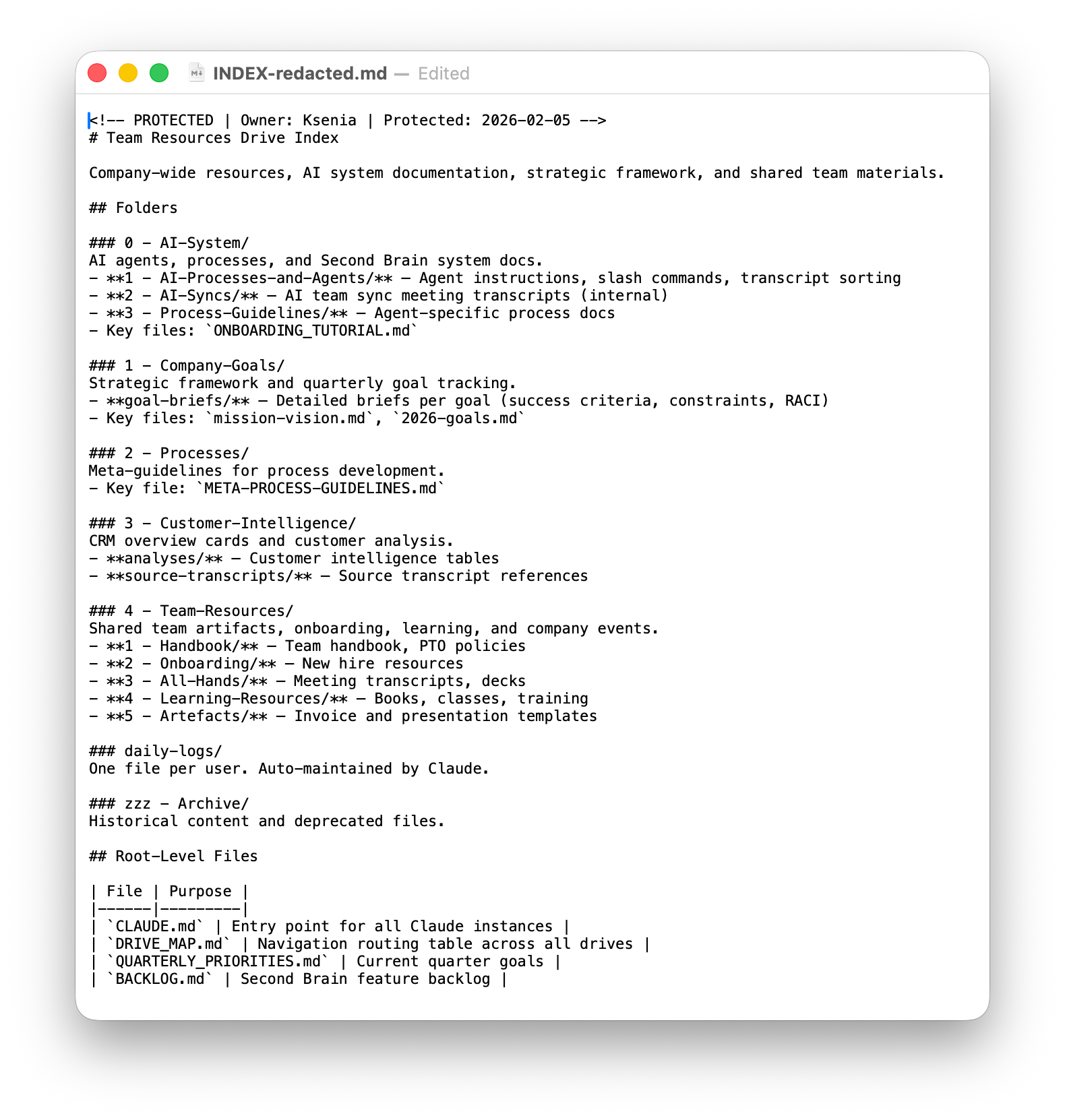
From there, Claude follows a chain:
DRIVE_MAP.md → drive's INDEX.md → subfolder's INDEX.md → target content
Each drive has an INDEX.md at its root. Major subfolders within each drive have their own INDEX.md. Every index file has the same job: describe what lives here, how it's organized, and where to go next based on the question being asked.
The practical consequence: almost none of the context window goes to orientation. That working memory goes to the actual work.
A critical maintenance rule comes from this design: every INDEX.md must reflect reality. When a folder is created, moved, or renamed, the relevant INDEX.md gets updated in the same session. An INDEX.md that doesn't match the current structure sends Claude the wrong way with confidence, which is worse than having no index at all. This maintenance is something I plan to automate using Anthropic's newly released /schedule commands, that allow you to run recurring tasks on a schedule, without your input. A dream!
What the system can do: skills and commands
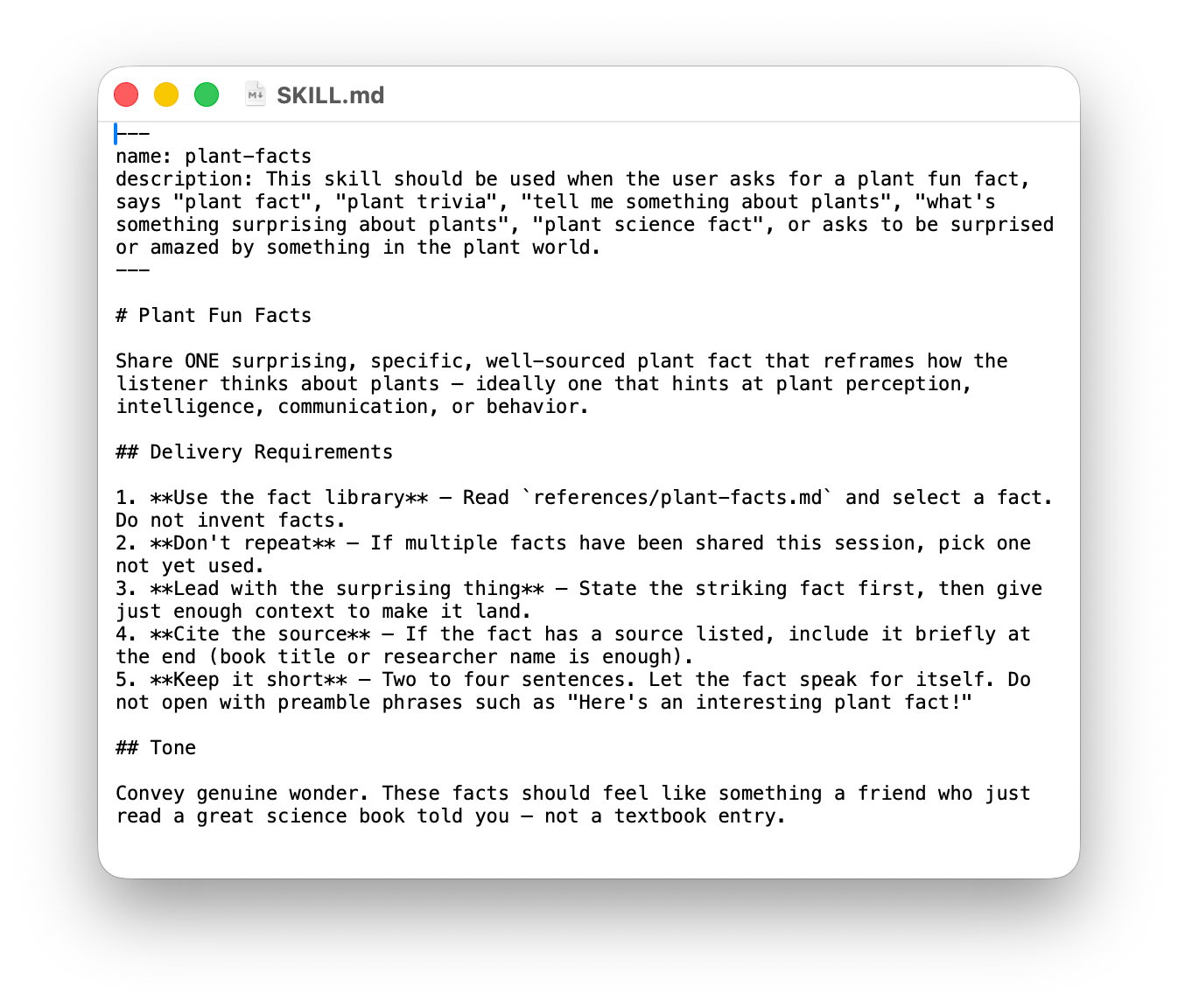
Skills and commands are the action layer — markdown files that define reusable workflows Claude can execute on demand. Like CLAUDE.md, the skill and command infrastructure is native to Claude Code. The platform provides the mechanism (a .claude/commands/ and .claude/skills/ directory where you place markdown files that become invocable via slash commands). We provide the workflows.
Commands are simpler and self-contained:
/archive-logsmoves week-old daily log entries to their archive files/new-transcript-sortsyncs meeting transcripts from our recording tool and sorts them into the right folders/expense-reconruns the full monthly expense reconciliation — Ramp transactions in, updated projections and flagged discrepancies out
Skills are richer. They carry supporting reference files, templates, and guidance documents alongside the main workflow definition.
The four weekly sync skills — /cs-sync, /sales-sync, /partner-sync, /marketing-sync — run every Monday. They pull live data from Asana, Gmail, and Google Drive, surface account health and deal momentum, and present a decision interface before executing updates. What used to be a full day of manual tab-pulling is now a series of commands.
/brand-voice gets called every time we draft external communications. It carries register guides for multiple audiences and keeps vocabulary and tone consistent regardless of who's writing.
The full library has two dozen skills and commands so far. Some are operational. Some are for content. A couple — /dad-joke, /plant-facts — exist purely because we like them.
What makes skills worth building: a workflow that lived in one person's head, or in a chat window, or in a document nobody looked at, gets written into a skill file once and becomes something any team member can invoke. And it's easier to update than any SOP has ever been.
External connections: how Claude reaches beyond the Drive
Claude connects to external tools through MCP — Model Context Protocol — which lets it interact with APIs as naturally as it reads files. We run servers for Google Workspace, Slack, Asana, Ramp, HubSpot, and more.
One deliberate constraint: Claude can search, read, and draft in Slack and Gmail, but it cannot send. Send operations are blocked in the permission settings. Claude prepares the message; I review and approve before it goes out. This is a safety rail, not a limitation. An agent that can silently send emails on your behalf is an agent you'll eventually stop trusting.
What's next
This post describes our engine. Everything else we will share — the builds, the workflows, the things we've been able to pull off as a team of eight — runs on top of it. I want to lay this foundation once so we have a shared understanding of how we got here.
Our answer to the AI question isn't chasing the fastest or smartest model. It's building an environment that makes our knowledge compound. Every week, I am more amazed at my team's curiosity and eagerness to adopt new ways of working and build tools that would have otherwise not been possible.